
You can make full songs with Suno AI even if you have no music training. Sign up for a free account, pick a creation mode, and type a few prompts to generate an instrumental or a song with lyrics in seconds. You can work on a computer or a phone using the iOS or Android app, then download MP3s or high-quality WAV files if you upgrade to Pro. But what is Suno Ai? If you want to skip right to the video you can do so right now!
You can also edit songs in deeper ways: add or write lyrics, change voices, remix tracks, split songs into stems, export MIDI, and publish your work to the Suno community so others can listen. Use simple prompts to explore styles, or switch to custom tools to control every part of the song as you learn and experiment.
Key Takeaways
- You can quickly create songs with simple prompts on desktop or mobile.
- The platform lets you add lyrics, edit stems, and export higher-quality files with upgrades.
- You can publish, share, and explore a community of listeners and trending tracks.
What Is Sunno AI?
Sunno AI is an easy-to-use music generator you can run on a computer or a phone. You sign up for a free account and get a set number of song generations each month.
You can create music two ways: a quick “simple” mode and a deeper “custom” mode. In simple mode, type a short prompt like “instrumental lo-fi hip hop” and Sunno will make a studio-quality track in seconds. In custom mode, you can paste or write your own lyrics, pick styles, or use a lyric-writing helper.
You can preview songs in the app and download them as MP3s. With a paid plan, you can download full-quality WAV files, video-ready social clips, stems, and MIDI. You can also remix tracks, extend them, or make mashups.
Sunno includes a library where all your creations are saved. You can publish songs on the platform so others can play and follow you. The app also suggests music styles if you need ideas.
Bold features:
- Free monthly song generations
- Mobile apps for Android and iOS
- Simple and custom creation modes
- Lyrics tools and lyric wizard
- Download options: MP3, WAV (pro), stems and MIDI (pro)
- Publish and share within Sunno’s community
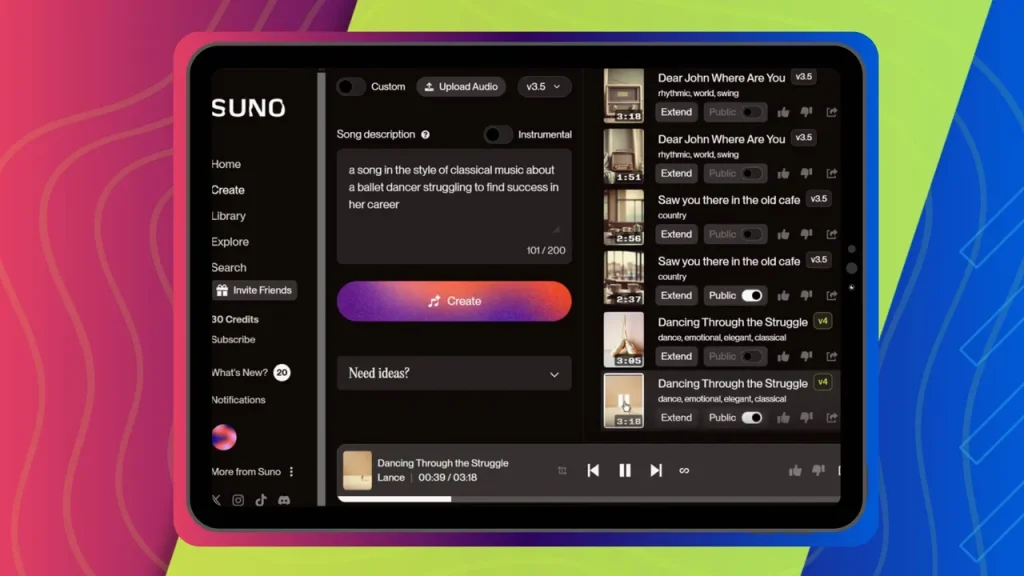
Key Features of Suno AI
AI Music Creation Tools
- Generate full songs in seconds using simple prompts like genre and mood.
- Create lyrics automatically or paste your own; a lyric helper can write lines from a short prompt.
- Produce studio-quality previews and export higher-quality files when available.
Works on Computers and Phones
- Use Sunno AI in a web browser or on mobile with Android and iOS apps.
- Access your projects in a library that stores all your creations.
- Publish songs inside the platform so others can listen and follow you.
Free Tier and Paid Upgrades
- A free account gives you a monthly allotment of song generations to try the tool.
- Pro upgrades unlock: WAV downloads, stems and MIDI exports, video exports, the studio editor, and other advanced remixing tools.
Getting Started With Suno AI
Setting Up Your Sunno Profile
- Sign up for a free Suno account on your computer or smartphone (Android or iOS app available).
- The free plan gives you a limited number of song generations each month.
- Log in, then open the Create area to begin making music.
- Your songs save in the Library so you can find them later.
Making Songs Quickly
- Choose between Simple or Custom creation modes.
- For a fast result, pick Simple, type a short prompt (for example, “instrumental lo-fi hip hop”), and click Create.
- The preview plays a quick version; full streaming-quality audio requires downloading.
- Use Custom mode to enter your own lyrics or use the Lyric Wizard to generate words from a prompt.
- Try different style suggestions if you need ideas for genres.
Saving and Exporting Your Tracks
- Open the song’s menu (three dots) to see download and publish options.
- Free users can download MP3s; Pro users can download high-quality WAV files, stems, MIDI, or a ready-to-share video.
- Publish a song to share it with the Sunno community and get a public link to send to others.
- Manage song settings and choose Publish when you want others to listen.
Music Creation Modes
Quick Start Mode
- Use this mode when you want a fast result.
- Type a short prompt like a genre and mood (for example: “instrumental lo-fi hip hop”) and press create.
- The system generates a near–studio-quality preview in seconds.
- Click the three dots next to a track to download an MP3. Pro users can download full-quality WAV or a ready-to-post video file.
Notes
- You can preview songs from your library.
- You can publish tracks so other users can listen and follow you.
- You can add simple lyrics by prompting the generator (e.g., describe the subject and singer).
Advanced Custom Mode
- Use this mode when you want more control.
- Paste or type your own lyrics, or use the lyric tool to generate them.
- Pick a specific style and tweak suggested options to learn about genres.
Features available when you upgrade to Pro:
- Export stems and MIDI for deeper editing.
- Use a studio view to isolate and change elements of the track.
- Remix, extend, or mash up songs and create new arrangements.
Working With Lyrics in Sunno AI
AI-Assisted Lyric Creation
You can have Sunno write lyrics for you with a short prompt. Tell it the mood, genre, singer type, and a simple idea (for example, “acoustic folk, female singer, about buying an ice cream”). Hit create and Sunno produces a full short song quickly.
Use the small lyric helper button to generate lines if you don’t want to write the whole song. The tool shows quick suggestions for styles and can teach you about different genres while you experiment.
- Speed: songs with lyrics appear in seconds.
- Output: preview plays in lower quality; download to get higher quality.
- Publishing: you can publish creations so other Sunno users can hear them.
Typing Your Own Lyrics
Switch to custom mode to paste or type your exact lyrics. This keeps the words you write while Sunno sets the musical style around them.
The custom lyric area also offers prompts and style suggestions to tweak the feel. You can combine your lyrics with different genres, download the finished track, or publish it to the Sunno community.
Exploring Advanced Tools
Studio Capabilities
You can open a studio view that breaks a song into separate tracks. This lets you mute, solo, or edit individual parts like drums, bass, or vocals.
You can also export stems or MIDI if you need separate files for mixing or further editing in another program.
Remixing and Stretching Songs
You can remix songs you made or imported by changing arrangements and swapping instruments.
You can lengthen or shorten a track to fit a video or match a desired song structure.
Use the built-in options to replace voices, tweak lyrics, or alter the genre to get new versions fast.
Combining Tracks and Mashups
You can create mashups by combining parts from different songs into one new piece.
The tool helps align tempo and key so merged tracks sound natural.
You can publish, share, or download the final mashup for streaming or social posts.
Community and Sharing Options
Publish Your Tracks
You can make your songs public on Sunno so other users can listen and follow you. Open your library, find the song, click the three dots on the right, and choose the publish option. Published tracks show play counts and can appear in trending lists.
- Private by default: keep songs private until you publish.
- Published content: anyone on Sunno can play and follow you.
- Trending reach: some songs get hundreds of thousands of plays on the platform.
Connect With the Sunno Community
Use Sunno’s built-in social features to grow your audience and join conversations. People on the platform can follow you and listen to your posted songs.
- Follow and be followed: builds your presence on Sunno.
- Explore trending songs to see what’s popular.
- Use the platform to share ideas and get feedback.
Share Links and Social Posts
Send your music outside Suno with direct links or social-ready files. From the song menu, you can copy a share link to text or email. Pro users can also download higher-quality files and ready-made video clips for social platforms.
- Quick share: copy link and send via message or email.
- Downloads: MP3 for free users; WAV and video exports for Pro.
- Use direct links to let people listen without signing in.
Tips for Getting the Most from Suno AI
Sign up for a free account first.
You get a limited number of free song generations each month. Use this to learn the tools before paying.Choose between Simple and Custom modes.
Use Simple for fast results. Use Custom when you want to add your own lyrics or tweak styles.Use short, clear prompts.
Tell Sunno the genre, mood, and any key details (instrumental, vocal type, topic). Keep prompts direct.Try the lyric tools.
Use the Lyric Wizard to generate words or paste your own lyrics in Custom mode to control the song’s message.Preview before downloading.
The play preview is lower quality. Download MP3 or WAV (Pro gives full WAV quality) for final use.Use the three-dot menu for actions.
Download, publish, or share songs from the song’s menu. Publishing lets other Sunno users hear and follow you.Explore genre suggestions.
When unsure about styles, pick from the suggestions to learn differences and discover sounds you like.Use the app on phone or computer.
Sunno works on desktop and mobile (Android/iOS), so create wherever you are.Upgrade when you need advanced features.
Pro unlocks studio tools: stems, MIDI, high-quality WAV, video downloads, longer edits, and mashups.Keep songs organized in Library.
Store your projects, revisit creations, and export stems or remixes when you need them.Share links to your songs.
Send song links by text or email to get feedback or promote your tracks.
Final Thoughts
You can start making songs quickly with Sunno AI on your phone or computer. Sign up for a free account and you’ll get a monthly allotment of free music generations to try.
Use the Simple mode to make a track by typing a short prompt, or pick Custom to paste your own lyrics and tweak style settings. Previews play fast, and you can download MP3s for free or WAVs with a paid plan.
Publish your work to Sunno’s community so others can listen, follow you, and share your songs. The platform also offers remixing, stem editing, MIDI export, video exports, and other studio tools if you want more control.
If you want higher-quality downloads and studio features, consider upgrading to Pro. Otherwise, the free tier gives you plenty to learn and create with.